

It’s 9:47 PM on a Tuesday night. You’re staring at a physics problem that might as well be written in another language. Your textbook isn’t helping, YouTube tutorials are too long, and your study group chat has gone silent. You need help — right now, on your terms, without waiting for anyone else’s schedule to align with yours.
This is the exact moment when a helping homework app becomes more than a convenience. It becomes a lifeline. Millions of students across the globe face this scenario every single week, struggling not because they aren’t smart enough, but because they don’t have the right support at the right time. Traditional tutoring is expensive, office hours are limited, and not every question has a simple answer you can Google.
That’s where modern AI-powered tools come in. A new generation of homework helper apps is transforming how students learn, practice, and master difficult material. Among them, Scrny stands out as a desktop and mobile application built specifically to help students break through those late-night study walls — using nothing more than a screenshot of the problem in front of them.
What Is a Helping Homework App, and Why Do Students Need One?
A helping homework app is any software tool designed to assist students in completing, understanding, and learning from their homework assignments. These apps range from simple calculators and formula sheets to sophisticated AI-driven platforms that can analyze complex problems across multiple subjects and provide step-by-step guidance.
But in 2026, the definition has evolved. Today’s best homework helper apps don’t just spit out answers — they teach. They adapt to the student’s level, break problems into digestible steps, and help build the kind of deep understanding that actually sticks on exam day.
Why the Demand Is Growing
Several factors are driving more students than ever toward apps that help with homework:
- Increasing academic pressure: Course loads are heavier, and expectations are higher across middle school, high school, and college.
- Limited access to tutors: Not every student can afford private tutoring, and school resources are often stretched thin.
- Diverse learning needs: Students learn differently. Some need visual explanations, others need guided questioning, and many need both.
- The always-on study cycle: Homework doesn’t follow a 9-to-5 schedule. Students need help at midnight just as often as at noon.
A reliable helping homework app meets students where they are — literally and figuratively — providing instant, personalized academic support whenever it’s needed.
How AI-Powered Homework Apps Work in 2026
The technology behind today’s AI homework help apps has matured significantly. Gone are the days of clunky keyword searches that returned irrelevant results. Modern platforms use advanced computer vision, natural language processing, and large language models to understand problems the way a tutor would.
Screenshot-Based Input
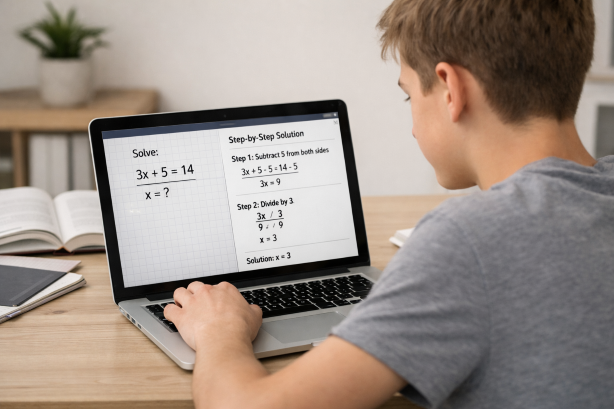
One of the most significant innovations in homework app technology is screenshot-based problem recognition. Instead of forcing students to type out complicated equations, chemical formulas, or multi-part word problems, apps like Scrny let you simply take a screenshot of your homework question.
Here’s how it works with Scrny:
- Capture: You screenshot any homework problem on your screen — whether it’s from a PDF, a learning management system, an online textbook, or a photo of a physical worksheet.
- Analyze: Scrny’s AI engine processes the image, identifying the subject matter, the type of problem, and the specific question being asked.
- Respond: Within moments, you receive a detailed, structured response that walks you through the solution.
This approach eliminates the friction that makes other tools frustrating. No need to retype a complex integral. No need to figure out how to format a chemistry equation in a search bar. Just screenshot and learn.
Two Modes of Learning
What separates a great helping homework app from a mediocre one is how it delivers its assistance. Scrny addresses this with two distinct modes:
- Answer Mode: Provides direct, step-by-step solutions. Ideal when you’re checking your work, running short on time, or need to see the full solution path to understand the method.
- Learn Mode: Uses a Socratic approach, asking guiding questions that lead you to the answer on your own. This mode is designed for deeper understanding and long-term retention.
You can read more about how Learn Mode transforms the homework experience on our blog.
Subjects a Homework Helper App Should Cover
Not all homework apps are created equal. Some specialize in math alone, while others try to cover everything but do nothing well. The best app that helps with homework should provide meaningful support across the subjects students actually struggle with.
Mathematics
Math is consistently the number one subject students seek help with. A quality AI homework help app should handle:
- Arithmetic and pre-algebra
- Algebra I and II
- Geometry and trigonometry
- Precalculus and calculus
- Statistics and probability
- Word problems and applied math
Scrny excels here, processing everything from simple fraction problems to multi-variable calculus. For a deeper look at math-specific capabilities, check out our guide on using an AI math homework helper.
Science
From balancing chemical equations to solving circuit diagrams, science homework presents unique challenges because it often combines mathematical computation with conceptual reasoning. A capable helping homework app should understand:
- Physics (mechanics, thermodynamics, electromagnetism)
- Chemistry (stoichiometry, organic chemistry, molecular structures)
- Biology (genetics, cell biology, ecology)
- Earth and environmental science
Coding and Computer Science
As more high school and college curricula incorporate programming, students need help debugging code, understanding algorithms, and working through logic problems. Scrny can analyze screenshots of code in languages like Python, Java, JavaScript, and C++, identifying errors and explaining the logic behind corrections.
Multiple Choice and General Subjects
Sometimes homework isn’t about solving an equation — it’s about understanding a concept well enough to choose the right answer. Scrny handles multiple-choice questions across subjects like history, literature, economics, and psychology by analyzing the question and each option, then explaining why one answer is correct and others aren’t.
Why Choose Scrny as Your Helping Homework App
With dozens of homework tools available in 2026, it’s fair to ask: why Scrny? The answer comes down to a combination of design philosophy, technical capability, and genuine commitment to student learning.
Built for the Desktop and Mobile Experience
Most homework apps are mobile-only, designed for quick snapshots from a phone camera. But in reality, a huge percentage of student homework happens on laptops and desktops — through online portals, PDFs, and digital textbooks. Scrny is built as a native desktop application for both Windows and macOS, as well as a mobile app, making it seamlessly integrated into the environment where you’re actually doing your work.
No need to photograph your screen with your phone and upload it somewhere. Just screenshot directly on your computer, and Scrny handles the rest. Learn more about how screenshot-based homework help simplifies the entire process.
Emphasis on Understanding, Not Just Answers
Scrny was designed with a core belief: the goal of homework isn’t to fill in blanks. It’s to learn. That’s why Learn Mode exists — to ensure that students who want to genuinely understand the material have a tool that coaches them through it, rather than doing the work for them.
This distinction matters. Students who use Scrny’s guided approach consistently report better performance on exams because they’ve engaged with the material actively, not passively.
Speed and Accuracy
When you’re working through a dense assignment, every minute counts. Scrny delivers responses in seconds, not minutes. And while no AI tool can guarantee perfection on every single problem, Scrny’s analysis engine is designed for high accuracy across all supported subjects, with clearly structured explanations that make it easy to verify the logic yourself.
Privacy-First Design
Scrny processes your screenshots with privacy in mind. Your homework questions aren’t stored indefinitely or shared. It’s a tool that works for you — not one that monetizes your academic data.
Tips for Getting the Most Out of a Homework Helper App
Having access to a powerful helping homework app is only half the equation. How you use it determines whether it becomes a genuine learning accelerator or just another digital distraction. Here are best practices for making the most of your experience.
1. Try the Problem Yourself First
Before reaching for any tool, spend at least five minutes wrestling with the problem on your own. This primes your brain to receive and retain the explanation when you do get help. Even a failed attempt teaches your mind what gaps exist in your understanding.
2. Use Learn Mode for New Concepts
When you’re encountering a topic for the first time — whether it’s integration by parts or the Krebs cycle — choose Learn Mode. The Socratic questioning approach helps you build mental frameworks you’ll rely on for the rest of the course.
3. Use Answer Mode for Review and Verification
When you’ve already worked through problems and want to check your solutions or see alternative methods, Answer Mode is your best friend. It’s also invaluable when you’re reviewing for an exam and need to see clean, step-by-step solutions.
4. Study the Explanations, Not Just the Answers
The real value of any AI homework help app lies in its explanations. Don’t just scroll to the final answer. Read each step. Ask yourself, “Could I reproduce this on my own?” If the answer is no, go through it again — or switch to Learn Mode for a more interactive experience.
5. Keep a Running List of Weak Spots
As you use Scrny, you’ll start noticing patterns in the types of problems that trip you up. Keep a simple list — whether on paper or in a notes app — of topics that consistently give you trouble. Use this list to guide your study sessions and targeted practice.
6. Combine with Other Study Strategies
A helping homework app works best as part of a broader study system. Pair it with techniques like spaced repetition, active recall, and practice testing for maximum impact. Scrny handles the “I’m stuck right now” moments; your broader study habits handle long-term mastery.
Frequently Asked Questions
What is the best helping homework app for high school students in 2026?
Scrny is one of the top-rated homework helper apps for high school students in 2026. It covers math, science, coding, multiple choice, and general subjects, all through an intuitive screenshot-based interface. Its dual-mode system — Answer Mode and Learn Mode — makes it suitable for both quick help and deep learning.
Can a homework app help me actually learn, or does it just give answers?
The best homework apps do both, but the key is how you use them. Scrny’s Learn Mode is specifically designed to guide you toward the answer through questions and hints, mimicking the experience of working with a skilled tutor. This approach promotes genuine understanding and long-term retention, not just short-term completion.
How does a screenshot-based homework app work?
You take a screenshot of any homework problem displayed on your computer or phone screen. The app’s AI analyzes the image — recognizing text, equations, diagrams, code, and more — and generates a detailed response. With Scrny, this process takes only seconds and works across a wide range of subjects and problem types.
Does Scrny work on both Windows and Mac?
Yes. Scrny is available as a native desktop application for both Windows and macOS, as well as a mobile app. This makes it especially convenient for students who do most of their homework on a computer, since you can screenshot problems directly without needing a separate device.
Homework doesn’t have to be a nightly battle against confusion and frustration. With the right helping homework app, every assignment becomes an opportunity to learn something new, build confidence, and develop the kind of problem-solving skills that extend far beyond the classroom.
Scrny was built for exactly this purpose — to give students instant, intelligent, and genuinely educational support whenever they need it. Whether you’re tackling calculus at midnight, debugging Python code before a deadline, or reviewing chemistry concepts for tomorrow’s exam, Scrny meets you where you are with the help you actually need.
Ready to change the way you study? Visit Scrny.ai and discover what a truly smart homework helper app can do for your academic life.
Turn a Screenshot Into an AI Answer in 3 Seconds.
Snip an image and let our AI answer generator do the rest.
Save time: no copy-pasting questions.
Stay accurate: 99 % accuracy using the latest AI answer generator technology
Monthly Subscription. Cancel anytime.
Recommended Articles

[
AI Homework Helper: Screenshot Any Question, Get Instant Answers
](https://scrny.ai/)
By Scrny.ai
[
How to Use Screenshot Homework Help: Snap a Photo, Get Step-by-Step Solutions
](https://scrny.ai/blog/screenshot-homework-help)
By Scrny.ai

[
Best AI Homework Helper 2026: Top Tools Compared
](https://scrny.ai/blog/best-ai-homework-helper)
By Scrny.ai