

It’s 11 p.m. on a Tuesday night. You’re staring at a chemistry problem set that might as well be written in hieroglyphics, your textbook isn’t helping, and your study group went silent on the group chat two hours ago. Sound familiar? You’re not alone — millions of students find themselves stuck on difficult homework problems every single night, with nowhere to turn for help.
That’s exactly why AI apps to help with homework have exploded in popularity over the past few years. Instead of waiting until office hours or hiring an expensive tutor, students can now get instant, detailed explanations for virtually any subject — right from their computer or phone. These tools use artificial intelligence to break down problems, walk through solutions, and help students actually understand the material rather than just copy an answer.
Among the growing number of AI homework helper apps available in 2026, Scrny stands out as a powerful desktop and mobile application designed to make homework help as simple as taking a screenshot. Whether you’re struggling with calculus, AP Biology, or a tricky coding assignment, Scrny analyzes your homework question in seconds and delivers clear, step-by-step guidance. But before we dive into what makes Scrny different, let’s explore the broader landscape of AI-powered homework tools and how to choose the right one for your needs.
What Are AI Apps to Help with Homework?
AI apps to help with homework are software applications that use artificial intelligence — specifically technologies like natural language processing (NLP), computer vision, and large language models — to assist students with academic questions. These tools can interpret text, images, equations, and even handwritten problems to generate solutions, explanations, and learning pathways.
Unlike traditional search engines where you’d have to type out a question and sift through dozens of web pages, AI homework helper apps are designed to understand your specific problem and deliver a targeted response. The best ones don’t just give you an answer — they explain the reasoning behind it, helping you build genuine understanding.
Here’s what most AI-powered homework apps can handle:
- Math problems — from basic algebra to advanced calculus and statistics
- Science questions — physics, chemistry, biology, and environmental science
- Multiple choice questions — standardized test prep and quiz review
- Coding assignments — debugging, writing functions, and understanding algorithms
- General subjects — history, literature analysis, economics, and more
The key difference between these apps and simply Googling your homework is specificity and context. An AI homework app analyzes your exact problem and generates a tailored response, saving you time and reducing the frustration of hunting for relevant information.
How AI Homework Helper Apps Actually Work
If you’ve never used an AI app for homework help before, the process is more intuitive than you might expect. While every app works a bit differently, most follow a general workflow that gets you from “stuck” to “solved” in under a minute.
Step 1: Input Your Question
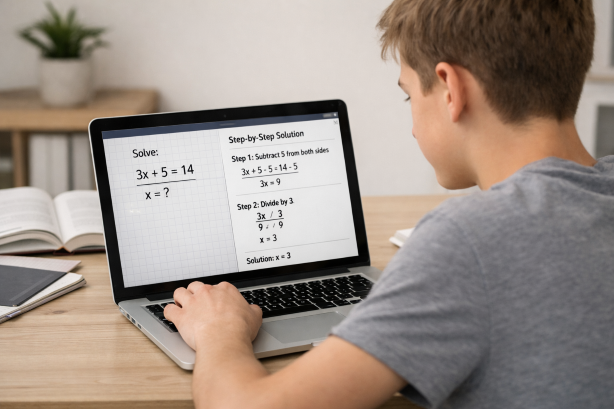
The first step is getting your homework problem into the app. Depending on the tool, you might type a question, upload a photo, or — in the case of apps like Scrny — simply take a screenshot of the problem on your screen. Screenshot-based input is one of the fastest methods because it captures the exact formatting, diagrams, and notation of your problem without requiring you to retype anything.
For a deeper look at how screenshot-based input works, check out our guide on screenshot homework help.
Step 2: AI Analysis
Once the app receives your problem, the AI engine gets to work. It uses computer vision to interpret images and equations, then applies its training to understand what’s being asked. This is where the quality of the AI model matters enormously — a good model won’t just recognize text, it will understand mathematical notation, scientific diagrams, code syntax, and the context of the question.
Step 3: Solution and Explanation
Finally, the app delivers its response. The best AI apps to help with homework don’t stop at a bare answer. They provide:
- Step-by-step breakdowns of how to arrive at the solution
- Conceptual explanations that clarify the underlying principles
- Alternative approaches where applicable
- Follow-up prompts to test your understanding
This three-step process — input, analysis, response — is what makes AI homework apps so much more efficient than traditional study methods. You get personalized help in seconds, on your schedule, without waiting for a tutor or teacher.
What to Look for in the Best AI App for Homework Help
Not all AI homework helper apps are created equal. With dozens of options available in 2026, knowing what separates a genuinely useful tool from a gimmicky one is critical. Here are the key factors to evaluate when choosing an AI app for homework help:
Accuracy and Depth of Explanations
The most important feature of any homework AI app is the quality of its answers. Look for apps that provide detailed, step-by-step explanations rather than one-line answers. An app that shows you how to solve a problem is infinitely more valuable than one that just tells you the answer is “42.”
Subject Coverage
Some apps specialize in math only, while others cover a broad range of subjects. If you’re a student juggling multiple classes, you’ll want a tool that can handle everything from math homework to science, coding, and humanities — all in one place.
Input Flexibility
How do you get your problem into the app? Typing out a complex equation is tedious and error-prone. Apps that support image or screenshot input are significantly more convenient, especially for problems that include graphs, diagrams, or formatted equations.
Learning Features vs. Answer-Only Modes
This is a crucial distinction. Some AI apps simply spit out answers, which can be tempting but ultimately doesn’t help you learn. The best tools offer a learning-focused mode that guides you through the problem-solving process — asking you questions, giving hints, and helping you arrive at the answer yourself.
Platform Availability
Consider where you’ll use the app most. Some tools are web-only, some are mobile-only, and others are available across desktop and mobile platforms. A desktop app can be especially useful for students who do most of their homework on a laptop or computer, since you can screenshot problems directly from online textbooks, PDFs, and learning management systems.
Privacy and Security
You’re uploading homework questions that may contain personal information or proprietary course materials. Make sure the app you choose has clear privacy policies and doesn’t share your data with third parties.
Why Students Are Choosing Scrny as Their AI Homework Helper App
With so many AI apps to help with homework on the market, Scrny has carved out a unique position by focusing on what students actually need: fast, accurate, and educational help that works with the tools they already use.
Here’s what makes Scrny stand out:
Screenshot-Powered Input
Scrny is built around screenshot technology. Instead of typing out problems or taking a photo with your phone, you simply screenshot any homework question directly on your computer screen. This works seamlessly with online textbooks, PDF worksheets, learning management systems like Canvas and Blackboard, and even handwritten notes you’ve scanned. The AI reads and interprets the image instantly.
Two Powerful Modes: Answer Mode and Learn Mode
Scrny offers two distinct approaches depending on what you need:
- Answer Mode delivers a complete, detailed solution with step-by-step reasoning. This is ideal when you’re checking your work or need to understand a solved example.
- Learn Mode takes a Socratic approach, guiding you through the problem with questions and hints rather than just handing you the answer. This mode is designed to build your problem-solving skills and deepen your understanding of the material.
This dual approach means Scrny works as both a homework helper and a study tool — you can switch between modes depending on whether you’re doing practice problems or preparing for an exam.
Broad Subject Coverage
Scrny isn’t limited to one subject. It handles math at every level (arithmetic through calculus and beyond), science (physics, chemistry, biology), computer science and coding, multiple choice questions, and general academic subjects. One app for all your classes means fewer subscriptions and less switching between tools.
Desktop and Mobile Application
As an AI homework helper available on both Windows and macOS — plus mobile — Scrny integrates directly into your homework workflow. Since most students complete assignments on their computers, having a desktop app that can instantly capture and analyze on-screen problems is a massive time-saver compared to web-based or mobile-only alternatives.
Built for Learning, Not Cheating
Scrny is designed to be an educational tool. The detailed explanations, Learn Mode’s guided approach, and emphasis on understanding over memorization all point toward genuine academic growth. It’s the difference between copying someone’s notes and having a knowledgeable tutor sitting next to you, walking you through every step.
Tips for Getting the Most Out of AI Homework Apps
Using an AI app to help with homework is only as effective as your approach. Here are some best practices to make sure you’re actually learning — not just getting through your assignment.
1. Try the Problem First
Before you screenshot a question, spend at least a few minutes attempting it yourself. Even if you get stuck, the effort primes your brain to absorb the explanation more effectively. You’ll have a better sense of where you got confused, which makes the AI’s explanation more meaningful.
2. Use Learn Mode When Studying
If your AI app offers a guided or Socratic learning mode (like Scrny’s Learn Mode), use it during study sessions. Save Answer Mode for when you’re checking work or running short on time. The guided approach forces you to think through each step, which dramatically improves retention.
3. Read the Full Explanation
It’s tempting to skip straight to the final answer, but the real value of AI homework help is in the step-by-step breakdown. Read through the entire explanation, and if a step doesn’t make sense, ask the AI to clarify. Understanding the process is what will help you on exams when you don’t have an app available.
4. Practice Similar Problems
Once you understand how to solve a problem, look for similar ones and try them on your own. Repetition is still one of the most effective learning strategies, and AI apps are perfect for checking your work afterward.
5. Don’t Rely on AI Exclusively
AI apps to help with homework are powerful supplementary tools, but they work best alongside other study strategies: attending class, taking notes, participating in study groups, and asking your teacher for help when needed. Think of Scrny as your always-available study partner, not a replacement for active learning.
6. Verify When It Matters
While AI homework apps are remarkably accurate, no AI is perfect 100% of the time. For high-stakes assignments or exam prep, cross-reference the AI’s explanation with your textbook or class notes to make sure everything aligns.
Frequently Asked Questions
What are the best AI apps to help with homework in 2026?
In 2026, several AI-powered apps are available to help students with homework, but Scrny is one of the most versatile options. It combines screenshot-based input, step-by-step explanations, and a unique Learn Mode that guides students through problems. Its cross-subject coverage and desktop availability make it a strong all-in-one choice.
Are AI homework helper apps considered cheating?
Using an AI homework app isn’t inherently cheating — it depends on how you use it. Tools like Scrny are designed to help you understand material, not just copy answers. Using Learn Mode to work through problems step by step is no different from working with a tutor. Always follow your school’s academic integrity policies and focus on learning the concepts.
Can AI apps help with math homework specifically?
Absolutely. Math is one of the strongest areas for AI homework apps. Scrny, for example, can handle everything from basic algebra to calculus, statistics, and discrete math. Its screenshot input is especially useful for math since you don’t have to struggle with typing complex equations or notation. For more details, see our AI math homework helper guide.
Do I need an internet connection to use AI homework apps like Scrny?
Most AI homework helper apps, including Scrny, require an internet connection to process your questions since the AI analysis happens on powerful cloud servers. Make sure you have a stable connection for the best experience. Scrny’s desktop app is lightweight, so it doesn’t require significant bandwidth.
How is Scrny different from just using ChatGPT for homework?
While general-purpose AI chatbots can answer homework questions, Scrny is purpose-built for students. Its screenshot input means you don’t have to describe your problem in text — just capture it visually. Learn Mode provides guided, Socratic-style tutoring that chatbots don’t offer. And because Scrny is designed specifically for homework help, its explanations are structured for educational clarity rather than general conversation.
The right AI app to help with homework can transform your study routine — turning late-night frustration into productive learning sessions and helping you build confidence in even your toughest subjects. In 2026, these tools are more capable and accessible than ever, and choosing the right one comes down to accuracy, learning features, and ease of use.
Scrny checks all of those boxes. With its screenshot-powered input, dual Answer and Learn Modes, and broad subject coverage across a dedicated desktop and mobile app, it’s designed to be the homework helper you wish you’d always had. Stop staring at problems in silence and start understanding them — visit Scrny.ai and see how AI-powered homework help can work for you.
Turn a Screenshot Into an AI Answer in 3 Seconds.
Snip an image and let our AI answer generator do the rest.
Save time: no copy-pasting questions.
Stay accurate: 99 % accuracy using the latest AI answer generator technology
Monthly Subscription. Cancel anytime.
Recommended Articles

[
AI Homework Helper: Screenshot Any Question, Get Instant Answers
](https://scrny.ai/)
By Scrny.ai
[
How to Use Screenshot Homework Help: Snap a Photo, Get Step-by-Step Solutions
](https://scrny.ai/blog/screenshot-homework-help)
By Scrny.ai

[
Best AI Homework Helper 2026: Top Tools Compared
](https://scrny.ai/blog/best-ai-homework-helper)
By Scrny.ai