

It’s 11 PM on a Tuesday. You’re staring at a chemistry problem that makes absolutely no sense, your textbook reads like it was written in another language, and your study group chat has gone silent. You need help — not tomorrow during office hours, not next week at tutoring — right now.
This is the exact moment millions of students turn to an AI chat to help with homework. The appeal is obvious: instant, on-demand explanations for any question, any subject, any time of day. But not all AI homework tools are created equal. Some give you a bare answer with no context. Others require you to type out complex equations or diagrams, which is a nightmare in itself. And most generic AI chatbots weren’t designed with students in mind, leaving you to sort through vague, sometimes inaccurate responses.
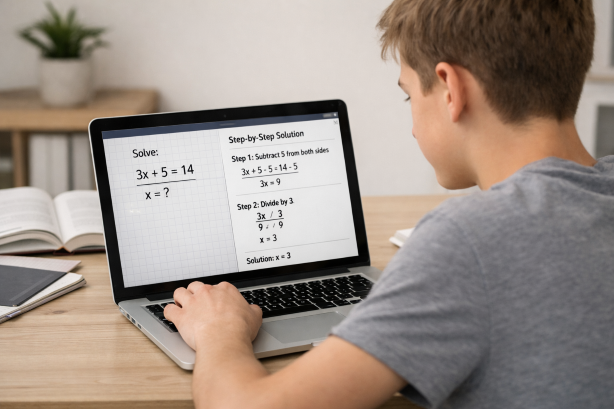
That’s where Scrny changes the game. Instead of forcing you to describe your homework problem in words, Scrny lets you simply screenshot the question — whether it’s a graph, a multi-step equation, a passage-based question, or a block of code — and get a detailed, step-by-step explanation powered by AI. It’s the AI chat for homework help that actually understands what you’re looking at.
What Is an AI Chat to Help With Homework?
An AI chat to help with homework is any artificial intelligence tool that allows students to interact conversationally with an AI system to get assistance on academic questions. Think of it as a virtual tutor that’s always available — one that can break down problems, explain concepts, and guide you toward the right answer.
These tools have evolved rapidly. Early versions were little more than glorified search engines, pulling pre-written answers from databases. In 2026, the best AI homework chat assistants use advanced language models and image recognition to understand nuanced, multi-step problems across virtually every subject area.
The most effective AI study chat tools share a few key traits:
- Contextual understanding — They don’t just pattern-match keywords; they grasp the full scope of a question.
- Step-by-step reasoning — They walk you through the process, not just the final answer.
- Multi-subject coverage — From calculus to coding to AP History, they handle it all.
- Accessibility — They’re easy to use, even when you’re stressed and short on time.
The shift from typing a question into a search bar to having a genuine back-and-forth conversation with AI has fundamentally changed how students approach studying. But the real breakthrough isn’t just the chat — it’s how the question gets into the chat in the first place.
How AI Homework Chat Tools Work — And Why Input Method Matters
Most AI chatbots require you to type your question. That works fine for straightforward prompts like “What year did World War I start?” But homework isn’t usually that simple.
Consider these common scenarios:
- A physics problem with a diagram of forces acting on an inclined plane
- A math worksheet with multiple equations formatted in specific notation
- A biology question that references a labeled cell diagram on the page
- A coding assignment with 30 lines of Python displayed on your screen
Typing these out accurately is tedious, error-prone, and sometimes impossible — especially for visual content. This is the critical limitation of most AI chat for students tools: the input bottleneck.
Screenshot-Based AI: Eliminating the Input Problem
Scrny solves this with a fundamentally different approach. Instead of typing, you take a screenshot of the homework question directly from your screen — or snap a photo from your phone. Scrny’s AI analyzes the image, interprets the text, symbols, diagrams, and formatting, and then delivers a comprehensive explanation.
This screenshot-first approach means:
- No re-typing complex equations — LaTeX, fractions, exponents, and special symbols are captured exactly as they appear.
- Diagrams and graphs are included — The AI sees what you see, so context is never lost.
- Speed — A screenshot takes seconds. Typing out the same problem could take minutes.
- Accuracy — What you capture is exactly what gets analyzed, reducing the risk of transcription errors.
For a deeper look at how screenshot-based homework help works, check out our guide on screenshot homework help.
Beyond Answers: How AI Chat Actually Helps You Learn
Here’s an important distinction that separates genuinely useful AI homework tools from shortcuts that hurt you in the long run: the best AI chat to help with homework doesn’t just hand you answers — it helps you understand the material.
Getting the answer to question #7 on tonight’s worksheet might feel like a win, but if you can’t solve a similar problem on Friday’s exam, you’ve gained nothing. This is why Scrny was built with two distinct modes.
Answer Mode: When You Need a Clear Solution
Answer Mode provides a direct, detailed solution to your homework question. But “direct” doesn’t mean “lazy.” Scrny’s Answer Mode includes:
- The final answer, clearly stated
- A full step-by-step breakdown of how to arrive at that answer
- Explanations of the reasoning behind each step
- Relevant formulas, rules, or concepts applied
This is ideal when you’ve already attempted a problem and want to check your work, or when you need to understand the solution pathway for a type of problem you’ll encounter again.
Learn Mode: Guided Understanding Through Conversation
Learn Mode is where Scrny truly stands apart as an AI homework chat assistant. Instead of showing you the answer, Learn Mode uses a Socratic approach — asking you guiding questions, giving hints, and nudging you toward the solution on your own.
For example, if you screenshot a quadratic equation, Learn Mode might respond with:
“I can see this is a quadratic equation. What methods do you know for solving quadratics? Have you tried identifying whether this can be factored?”
This back-and-forth mirrors working with a great tutor. You’re doing the thinking; the AI is keeping you on track. Studies consistently show that active problem-solving leads to dramatically better retention than passively reading solutions.
Learn more about this approach in our detailed breakdown of Learn Mode.
What Subjects Can AI Chat Help With?
One of the most common questions students have is whether an AI homework chatbot can handle their specific subject. The short answer with Scrny: almost certainly yes.
Math and Advanced Mathematics
Math is the number-one reason students seek out AI chat for homework help, and it’s where screenshot input is most valuable. Scrny handles:
- Algebra (linear equations, inequalities, systems of equations)
- Geometry (proofs, area/volume, coordinate geometry)
- Trigonometry
- Pre-calculus and calculus (limits, derivatives, integrals)
- Statistics and probability
- Discrete math
The AI doesn’t just solve — it shows every step, making it an invaluable AI math homework helper.
Science
From balancing chemical equations to interpreting free-body diagrams in physics to analyzing genetics problems in biology, Scrny’s AI can parse scientific notation, diagrams, and data tables captured in screenshots.
Computer Science and Coding
Screenshot a block of code that’s throwing an error, and Scrny will identify the issue, explain why it’s happening, and suggest how to fix it. It supports popular languages including Python, Java, JavaScript, C++, and more.
Humanities and Multiple Choice
AI chat isn’t just for STEM. Scrny can help with:
- Reading comprehension questions
- Essay prompt brainstorming
- Multiple choice questions across any subject
- History, economics, and social science problems
Why Choose Scrny as Your AI Homework Chat Tool
The market for AI study tools in 2026 is crowded. So why does Scrny stand out as the AI chat to help with homework that students actually rely on?
1. Screenshot-First Design
Scrny was built from the ground up around visual input. It’s not a generic chatbot with image upload bolted on as an afterthought — image analysis is core to how it works.
2. Desktop and Mobile App
Scrny runs as a native application on Windows, macOS, and mobile devices. This means fast performance, easy screenshot capture with keyboard shortcuts, and a distraction-free study environment separate from your browser.
3. Dual Learning Modes
No other tool gives you the flexibility to switch between getting direct answers and engaging in guided, Socratic learning. You choose the approach that fits your needs in the moment.
4. Multi-Subject Versatility
One tool for everything. You don’t need a separate app for math, another for science, and another for coding.
5. Detailed Explanations, Not Just Answers
Every response includes context, reasoning, and the “why” behind the solution. This is what transforms a homework helper from a crutch into a genuine learning accelerator.
6. Privacy-Focused
Scrny is a dedicated application, not a browser extension watching everything you do online. Your study sessions stay private.
Tips for Getting the Most Out of AI Chat for Homework
Using an AI homework chat assistant effectively is a skill in itself. Here’s how to maximize your results:
Start with your own attempt. Before screenshotting a question, spend a few minutes working through it yourself. Even a partial attempt gives you context that makes the AI’s explanation click faster.
Use Learn Mode first. It’s tempting to jump straight to Answer Mode, but using Learn Mode builds the problem-solving skills you’ll need on exams — where there’s no AI to help.
Screenshot cleanly. Capture just the question you need help with, not the entire page. A focused screenshot helps the AI deliver a more precise, relevant response.
Follow up. If something in the explanation doesn’t make sense, ask for clarification. Scrny’s chat interface is conversational — you can dig deeper on any step.
Review before moving on. After getting an explanation, try to solve a similar problem on your own without help. This is the single most effective way to lock in what you’ve learned.
Use it for exam prep, not just homework. Screenshot practice test questions, old exam problems, or textbook exercises to build comprehensive understanding before test day.
Frequently Asked Questions
Can I use AI chat to help with homework for any subject?
Yes. Scrny’s AI is designed to handle a wide range of subjects, including math, science, coding, humanities, and multiple choice questions. The screenshot-based input means it can interpret diagrams, equations, formatted text, and code — making it versatile enough for virtually any homework assignment you encounter.
Is using an AI homework chat assistant considered cheating?
That depends on how you use it. Using AI to understand concepts, check your work, and learn problem-solving methods is a legitimate study strategy — similar to working with a tutor. Scrny’s Learn Mode is specifically designed to guide you through problems without simply giving away answers, promoting genuine understanding over rote copying.
How is Scrny different from free AI chatbots for homework?
Generic AI chatbots aren’t purpose-built for education. They often struggle with complex equations, can’t interpret diagrams or screenshots natively, and don’t offer structured learning modes. Scrny is designed specifically as a homework tool — with screenshot-based input, step-by-step explanations, and both Answer and Learn modes that adapt to how you want to study.
Does AI chat work for advanced college-level homework?
Scrny handles a wide spectrum of difficulty levels, from middle school assignments through college-level coursework. It’s particularly strong with advanced math (calculus, linear algebra, statistics), upper-level science courses, and computer science. The AI provides detailed step-by-step reasoning regardless of problem complexity.
The days of struggling alone with homework at midnight are over. An AI chat to help with homework has become one of the most powerful tools in a modern student’s arsenal — but only when it’s built the right way. The best AI homework chat assistants combine effortless input, intelligent analysis, and a genuine focus on helping you learn, not just copy.
Scrny delivers exactly that. With screenshot-powered AI, dual learning modes, and coverage across every major subject, it’s the AI homework helper designed for how students actually study. Stop wrestling with problems alone and start studying smarter — download Scrny today and see the difference a purpose-built AI study tool makes.
Turn a Screenshot Into an AI Answer in 3 Seconds.
Snip an image and let our AI answer generator do the rest.
Save time: no copy-pasting questions.
Stay accurate: 99 % accuracy using the latest AI answer generator technology
Monthly Subscription. Cancel anytime.
Recommended Articles

[
AI Homework Helper: Screenshot Any Question, Get Instant Answers
](https://scrny.ai/)
By Scrny.ai
[
How to Use Screenshot Homework Help: Snap a Photo, Get Step-by-Step Solutions
](https://scrny.ai/blog/screenshot-homework-help)
By Scrny.ai

[
Best AI Homework Helper 2026: Top Tools Compared
](https://scrny.ai/blog/best-ai-homework-helper)
By Scrny.ai