

You’re staring at a problem set that’s due in the morning. The textbook isn’t making sense, YouTube tutorials are twenty minutes long and still don’t answer your specific question, and your study group chat has gone silent. Sound familiar?
Every student hits this wall — that frustrating moment when you’re stuck on a homework problem and have nowhere to turn. Maybe it’s a calculus integral that looks like a foreign language, a chemistry equilibrium equation with too many variables, or a coding assignment that throws errors no matter what you try. The problem isn’t that you’re not smart enough. It’s that traditional resources aren’t designed to meet you exactly where you are, exactly when you need them.
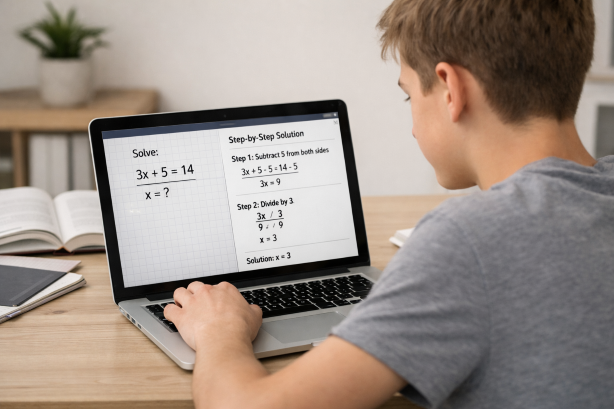
That’s where an AI helper for homework changes everything. Tools like Scrny are redefining how students study by providing instant, detailed explanations for virtually any homework problem — all from a simple screenshot. Instead of spending hours hunting for the right resource, you capture your question, and intelligent AI breaks it down step by step. It’s not about shortcuts. It’s about finally having a study partner that’s available whenever you need one and never gets tired of explaining things.
What Is an AI Helper for Homework?
An AI homework helper is a software application that uses artificial intelligence — specifically large language models and image recognition — to analyze homework questions and generate detailed explanations, solutions, and learning guidance. Unlike traditional search engines where you have to type out complex equations or describe a problem in words, modern AI homework helpers can interpret screenshots, handwritten notes, textbook photos, and digital documents.
The concept has evolved rapidly. Early homework help tools were essentially answer databases — you’d search for a question someone else had already asked and hope it matched yours. In 2026, AI helper homework tools are far more sophisticated. They can:
- Interpret visual input — photos of handwritten problems, screenshots of digital assignments, graphs, and diagrams
- Provide step-by-step breakdowns — not just the final answer, but the reasoning and methodology behind it
- Adapt to different subjects — from algebra and physics to literature analysis and computer science
- Offer multiple learning modes — so students can choose between getting a direct answer and being guided through the problem themselves
This shift from static answer banks to dynamic, AI-driven explanations is what makes modern tools genuinely useful for learning — not just for completing assignments.
How an AI Homework Helper Actually Works
If you’ve never used an AI helper for homework before, the process is simpler than you might expect. Here’s how it typically works with an application like Scrny.
Step 1: Capture the Problem
Instead of typing out a complex equation or trying to describe a word problem, you simply take a screenshot. Scrny runs as a desktop application on both Windows and macOS, so you can screenshot anything on your screen — a problem from an online textbook, a PDF worksheet, a learning management system, or even a photo of a handwritten problem you’ve transferred to your computer.
This screenshot-based approach eliminates one of the biggest friction points in getting homework help. You don’t have to worry about formatting mathematical notation, describing a graph in words, or copying code without losing indentation. The AI sees exactly what you see.
Step 2: AI Analysis
Once you submit your screenshot, the AI processes the image using optical character recognition and visual understanding models. It identifies the type of problem — whether it’s a multiple-choice question, a math equation, a science diagram, a coding challenge, or a written prompt — and applies the appropriate reasoning framework.
This is more than simple pattern matching. The AI understands context, recognizes formulas, reads handwriting, and interprets visual elements like graphs, tables, and charts.
Step 3: Get Your Explanation
Here’s where Scrny sets itself apart from generic AI chatbots. The application offers two distinct modes:
- Answer Mode delivers a clear, complete solution with full step-by-step reasoning. Every step is shown and explained so you can see how the answer was reached, not just what it is.
- Learn Mode takes a Socratic approach. Instead of handing you the answer, it asks guiding questions, gives hints, and nudges you toward solving the problem yourself. This is the mode that turns homework from a chore into an actual learning experience.
Both modes are available for every question, so you can switch depending on your goal. Reviewing for an exam and need to check your work quickly? Use Answer Mode. Genuinely trying to understand a new concept? Learn Mode will build your skills more effectively than any answer key ever could.
Subjects Where an AI Helper for Homework Makes the Biggest Impact
One of the most common questions students have is whether AI homework help actually works for their subject. The answer, in most cases, is yes. Here are the areas where an AI homework assistant truly shines.
Math at Every Level
From pre-algebra through calculus, linear algebra, and statistics, math is the single most popular use case for AI homework helpers. The visual nature of math — equations, graphs, geometric figures — makes screenshot input particularly powerful. Scrny can walk you through solving quadratic equations, integration by parts, matrix operations, probability problems, and more.
If you’re looking for a dedicated breakdown of math capabilities, check out our guide on AI math homework help.
Science (Physics, Chemistry, Biology)
Science homework often involves diagrams, formulas, and multi-step reasoning that’s hard to search for online. An AI helper for homework can interpret free-body diagrams, balance chemical equations, analyze Punnett squares, and explain thermodynamic cycles — all from a single screenshot.
Computer Science and Coding
Debugging code is notoriously difficult when you’re learning. Scrny can read screenshots of your code and error messages, identify what’s going wrong, and explain the fix in a way that teaches you the underlying concept. Whether you’re working in Python, Java, C++, or JavaScript, having an AI assistant that understands programming logic is invaluable.
Multiple Choice and Written Questions
Not every homework problem involves calculations. AI homework helpers are equally effective at analyzing multiple-choice questions, explaining why one answer is correct and others aren’t, and helping with reading comprehension, history, and social science assignments.
General Subjects and Essay Support
While Scrny isn’t a tool for writing your essays for you, it can help you understand essay prompts, develop thesis statements, outline arguments, and check your reasoning — making it a versatile AI homework assistant across the full curriculum.
Why Choose Scrny as Your AI Helper for Homework
The market for AI homework tools has grown significantly, so what makes Scrny the right choice in 2026? Several key factors set it apart.
Desktop-First Design
Scrny is purpose-built as a desktop and mobile application rather than a browser-based tool. This means it integrates seamlessly into your existing study workflow. You can screenshot anything on your screen — your LMS, an e-textbook, a PDF, a coding IDE — without switching tabs, copying and pasting, or reformatting.
Learn more about how screenshot homework help works and why it’s faster than any alternative.
Two Modes for Two Goals
Most AI tools offer one thing: an answer. Scrny’s dual-mode system (Answer Mode and Learn Mode) acknowledges that students have different needs at different times. Sometimes you need to verify your solution at 11 PM. Other times you want to genuinely learn the material before a midterm. Having both options in a single tool means you don’t need to juggle multiple apps.
Built for Students, Not Researchers
Generic AI chatbots like ChatGPT are powerful, but they’re general-purpose tools. You have to craft the right prompt, specify the level of detail you want, and hope the output is formatted in a way that’s useful for studying. Scrny is specifically designed for the homework use case — the interface, the output format, and the explanation style are all optimized for students who need to understand their coursework.
Privacy and Focus
As a dedicated desktop application, Scrny keeps your study sessions focused. There’s no social feed, no recommended videos, no rabbit holes. You screenshot a problem, get your explanation, and move on. For students who struggle with digital distractions, this streamlined experience makes a real difference.
Tips for Getting the Most Out of an AI Homework Helper
Using an AI helper for homework effectively is a skill in itself. Here are best practices that will help you study smarter, not just faster.
1. Start with Learn Mode Before Switching to Answer Mode
It’s tempting to go straight for answers, especially when you’re pressed for time. But using Learn Mode first — even briefly — forces your brain to engage with the material. You’ll retain more and build stronger problem-solving habits over time. If you get truly stuck, you can always switch to Answer Mode to see the full solution.
2. Use It as a Study Partner, Not a Replacement for Effort
An AI homework assistant is most powerful when it complements your own work. Try solving the problem yourself first, then use Scrny to check your reasoning or identify where you went wrong. This active learning approach is backed by decades of educational research and leads to significantly better outcomes on exams.
3. Screenshot the Full Context
When capturing a problem, make sure your screenshot includes all relevant information — the full question, any diagrams, given values, and instructions. The more context the AI has, the more accurate and helpful its explanation will be.
4. Review the Steps, Not Just the Answer
Even in Answer Mode, Scrny provides step-by-step explanations. Don’t skip straight to the bottom. Reading through the methodology is where the real learning happens. If a step doesn’t make sense, screenshot just that step and ask for a deeper explanation.
5. Use It Consistently Across Subjects
Many students discover AI homework help through math but never think to use it for other subjects. Try Scrny with your science, coding, and humanities assignments too. You might be surprised at how effective it is for multiple-choice analysis, code debugging, and conceptual questions.
Frequently Asked Questions
Is an AI helper for homework considered cheating?
It depends entirely on how you use it. Using Scrny to understand concepts, check your work, and learn problem-solving methods is no different from working with a tutor or attending office hours. The key is using it as a learning tool, not simply copying answers without understanding them. Most educators support tools that help students genuinely learn, and Scrny’s Learn Mode is specifically designed with this in mind.
What subjects does Scrny’s AI homework helper cover?
Scrny covers a wide range of subjects including math (from basic arithmetic through advanced calculus), physics, chemistry, biology, computer science, multiple-choice questions, and general academic subjects. The screenshot-based input means it can analyze virtually any type of homework problem that can be displayed on or captured by your screen.
How is Scrny different from just using ChatGPT for homework?
While ChatGPT is a general-purpose AI, Scrny is purpose-built for homework help. The key differences include native screenshot input (no need to type or format problems), dual Answer and Learn modes, student-optimized explanations, and a distraction-free desktop interface. Scrny is designed specifically for the student workflow, which means less prompt engineering and more time learning.
Does an AI homework helper work for college-level coursework?
Absolutely. Scrny’s AI is capable of handling college-level material across subjects including multivariable calculus, organic chemistry, data structures, linear algebra, and more. The step-by-step explanations are detailed enough to be useful at the undergraduate level and beyond, making it a valuable AI homework helper for students at any stage of their education.
The days of being stuck on a homework problem with no one to turn to are over. An AI helper for homework like Scrny gives you instant access to detailed, step-by-step explanations for any subject — all from a simple screenshot. Whether you’re trying to master a difficult concept through guided learning or need to verify your solution before submitting an assignment, Scrny adapts to how you study best.
Don’t let another frustrating study session go to waste. Visit Scrny.ai today and discover what it’s like to have an intelligent homework assistant on your desktop, ready to help whenever you need it.
Turn a Screenshot Into an AI Answer in 3 Seconds.
Snip an image and let our AI answer generator do the rest.
Save time: no copy-pasting questions.
Stay accurate: 99 % accuracy using the latest AI answer generator technology
Monthly Subscription. Cancel anytime.
Recommended Articles

[
AI Homework Helper: Screenshot Any Question, Get Instant Answers
](https://scrny.ai/)
By Scrny.ai
[
How to Use Screenshot Homework Help: Snap a Photo, Get Step-by-Step Solutions
](https://scrny.ai/blog/screenshot-homework-help)
By Scrny.ai

[
Best AI Homework Helper 2026: Top Tools Compared
](https://scrny.ai/blog/best-ai-homework-helper)
By Scrny.ai