

Scrny identifies this as a product rule problem and walks through the application: identifying u and v, computing u’ and v’, and combining them according to the product rule formula. The explanation clarifies why the product rule applies here rather than the chain rule, reinforcing the student’s conceptual understanding.
Example 3: A Word Problem in Statistics
A factory produces light bulbs with a mean lifespan of 1,200 hours and a standard deviation of 150 hours. What percentage of bulbs last between 1,050 and 1,350 hours?
Scrny recognizes this as a normal distribution problem, converts to z-scores, and references the standard normal table — explaining each conversion and what the final probability represents in context.
These aren’t hypothetical features. This is the kind of math help students use Scrny for every day.
Why Choose Scrny as Your AI Homework Helper for Math
There are several AI math tools available in 2026, so why does Scrny deserve a place on your desktop? Here are the key reasons:
- Screenshot-first design: No tedious equation typing. Capture any math problem — printed, digital, or handwritten — and get instant analysis. This is purpose-built for the way students actually encounter homework.
- Dual learning modes: Answer Mode and Learn Mode let you decide how much guidance you want. Use Answer Mode to check solutions and Learn Mode to prepare for exams.
- Desktop and mobile app: Scrny runs natively on Windows, macOS, and mobile devices. It’s designed for the environment where students actually do homework — at their computer, with assignments open on screen.
- Multi-subject coverage: While this article focuses on math, Scrny also handles science, coding, multiple choice questions, and general subjects. One tool covers your entire homework load. Explore the full capabilities on the AI homework helper page.
- Detailed explanations, not just answers: Every response includes reasoning, not just results. This is what separates a learning tool from a cheat sheet.
- Broad math coverage: From middle school pre-algebra through college-level calculus and statistics, Scrny handles the full spectrum of math coursework.
For a closer look at Scrny’s math-specific capabilities, check out our detailed guide on using an AI math homework helper.
Tips for Getting the Most Out of AI Math Homework Help
Using an AI homework helper for math effectively is about more than just screenshotting and reading answers. Here are best practices to maximize your learning:
1. Try the Problem First
Before screenshotting, spend at least a few minutes attempting the problem on your own. Even a partial attempt helps you engage with the material and gives you context for understanding the AI’s explanation.
2. Use Learn Mode for New Concepts
When you’re encountering a topic for the first time — say, integration by parts or matrix multiplication — use Learn Mode. The Socratic approach forces you to think actively, which dramatically improves retention compared to passively reading a solution.
3. Use Answer Mode to Check and Compare
After solving a problem yourself, use Answer Mode to verify your work. Pay attention to whether your method matches the AI’s approach. If the AI used a more efficient technique, take note — that’s a learning opportunity.
4. Focus on Understanding Steps, Not Just Answers
When reviewing a solution, don’t skip to the final line. Read each step and ask yourself: “Could I reproduce this step on my own?” If the answer is no, that’s the concept you need to study further.
5. Work Through Similar Problems
After the AI helps you with one problem, try two or three similar ones independently before moving on. This builds the fluency that leads to confidence on tests.
6. Screenshot Clearly
For the best results, make sure your screenshot captures the entire problem clearly. If it’s a handwritten problem, ensure the writing is legible. Clean input leads to accurate, detailed output.
Frequently Asked Questions
Can an AI homework helper solve all types of math problems?
Scrny covers a wide range of math topics, from basic arithmetic and algebra through calculus, statistics, and beyond. While AI handles the vast majority of standard homework problems effectively, extremely specialized or graduate-level topics may occasionally fall outside its scope. For typical middle school, high school, and undergraduate coursework, coverage is comprehensive.
Is using an AI math homework helper considered cheating?
It depends entirely on how you use it. Using Scrny to understand problem-solving methods, check your work, and learn from step-by-step explanations is no different from using a tutor or study guide. Learn Mode is specifically designed to teach you the process rather than hand you answers. Always follow your school’s academic integrity policies, and prioritize understanding over copying.
How is Scrny different from free online math calculators?
Free math calculators typically require you to type equations in specific formats and return only final answers. Scrny accepts screenshots of problems in any visual format — textbook pages, handwritten notes, online assignments — and provides detailed, step-by-step explanations in two different learning modes. The depth of explanation and ease of input are fundamentally different experiences.
Does the AI homework helper for math show its work step by step?
Yes. Both Answer Mode and Learn Mode provide step-by-step breakdowns. Answer Mode shows every step of the complete solution with explanations. Learn Mode guides you through the steps interactively, prompting you to think through each stage before revealing the next hint.
What devices can I use Scrny on for math homework help?
Scrny is available as a desktop application for both Windows and macOS, as well as on mobile devices. Since most students do math homework on their computers — with assignments open in browsers, PDFs, or online platforms — the desktop app is especially convenient for taking quick screenshots without switching between devices or apps.
Math doesn’t have to be the subject that keeps you up past midnight, stressed and stuck. With the right AI homework helper for math, every problem becomes an opportunity to learn — not just an obstacle to overcome. Scrny’s screenshot-based approach, dual learning modes, and detailed step-by-step explanations make it one of the most effective tools available for students who want to improve their math skills in 2026.
Stop struggling in silence and start understanding the math in front of you. Visit Scrny.ai to see how screenshot-powered AI can transform the way you learn, one problem at a time.
” _builder_version=”4.27.5″ _module_preset=”default” text_font=”Red Hat Display||||||||” text_text_color=”#15141D” text_line_height=”1.8em” header_font=”Red Hat Display|600|||||||” header_text_color=”#FFFFFF” header_font_size=”32px” header_2_font=”Red Hat Display|800|||||||” header_2_text_color=”#15141D” header_2_font_size=”47px” header_3_font=”Red Hat Display|700|||||||” header_3_text_color=”#15141D” header_3_font_size=”32px” custom_margin=”||25px||false|false” hover_enabled=”0″ header_2_font_size_tablet=”60px” header_2_font_size_phone=”50px” header_2_font_size_last_edited=”on|phone” global_colors_info=”{}” sticky_enabled=”0″]
You’re staring at a calculus worksheet at 10 PM. The textbook explanation makes no sense, the YouTube video you found covers a slightly different problem type, and your study group chat has gone quiet. Sound familiar? For millions of students, math homework isn’t just a nightly task — it’s a nightly source of frustration, anxiety, and wasted time.
The core problem isn’t that math is impossible. It’s that traditional homework help often fails at the exact moment you need it most. Tutors aren’t available at midnight. Search engines return generic explanations that don’t match the specific problem in front of you. And typing a complex equation into a search bar? That’s its own special kind of torture.
That’s why an AI homework helper for math has become one of the most sought-after tools for students in 2026. And among the growing number of options, Scrny stands out by doing something remarkably simple: you screenshot the problem, and the AI explains exactly how to solve it. No typing. No reformatting. No guesswork. Just clear, step-by-step guidance from a desktop app that’s designed to help you actually learn.
What Is an AI Homework Helper for Math?
An AI homework helper for math is a software tool that uses artificial intelligence to analyze, solve, and explain mathematical problems. Unlike a basic calculator or a formula sheet, these tools leverage advanced AI models to understand context, recognize problem types, and walk students through the reasoning behind each step.
The best AI math homework helpers go beyond spitting out a final answer. They break down the logic of each step, identify the concepts being tested, and help students build the kind of understanding that leads to better test scores — not just completed worksheets.
In recent years, the technology has evolved dramatically. Early math solvers could handle basic arithmetic and simple algebra. Today’s tools, including Scrny, can process everything from trigonometric identities and derivative problems to statistics questions, combinatorics, and multi-step word problems. The key differentiator in 2026 is how the AI delivers help — and whether it prioritizes learning over shortcuts.
How AI Math Tools Differ from Traditional Calculators
It’s worth clarifying what makes an AI-powered math helper fundamentally different from a graphing calculator or a formula reference app:
- Contextual understanding: AI tools can read a full word problem, interpret what’s being asked, and select the right approach — not just compute numbers.
- Step-by-step explanations: Rather than jumping to an answer, quality AI helpers explain why each step happens.
- Visual input recognition: Tools like Scrny accept screenshots, meaning you can capture handwritten problems, textbook pages, or online assignments exactly as they appear.
- Adaptive depth: Some tools offer multiple modes of help, from direct answers to Socratic-style guided learning.
This combination transforms a math helper from a passive tool into an active learning partner.
How Scrny Works as an AI Homework Helper for Math
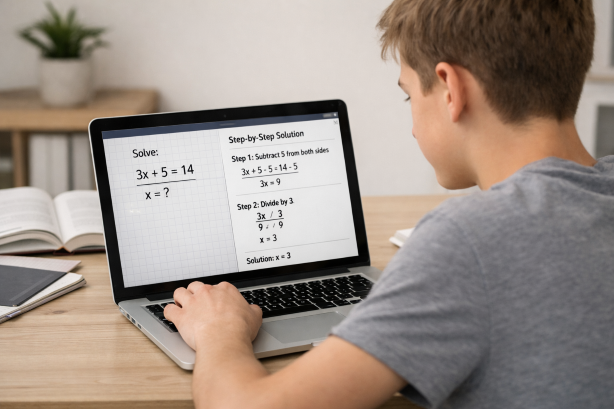
Scrny is a desktop and mobile application available on Windows and macOS that takes a screenshot-first approach to homework help. Here’s how the process works when you’re tackling a math assignment:
Step 1: Screenshot Your Math Problem
Open Scrny and take a screenshot of any math problem — whether it’s displayed on a webpage, typed in a PDF, written in a textbook you’ve photographed, or even handwritten in your notebook. Scrny’s AI is built to process images, so you don’t need to manually type out complex equations, fractions, or symbols.
This is a significant advantage for math specifically. Anyone who has tried to type ∫(3x² + 2x − 7)dx into a search bar knows how painful it is. With Scrny, you simply capture the image and let the AI read it.
Step 2: The AI Analyzes the Problem
Once Scrny receives the screenshot, the AI identifies the type of problem, the relevant mathematical concepts, and the most efficient solution path. It recognizes a wide range of math topics, including:
- Algebra (linear equations, systems of equations, inequalities, polynomials)
- Geometry (proofs, area/volume calculations, coordinate geometry)
- Trigonometry (identities, unit circle problems, law of sines/cosines)
- Calculus (limits, derivatives, integrals, series)
- Statistics and Probability (distributions, hypothesis testing, combinations/permutations)
- Pre-algebra and Arithmetic (fractions, ratios, percentages, order of operations)
Step 3: Choose How You Want to Learn
This is where Scrny truly differentiates itself from a simple math solver. You choose between two modes:
- Answer Mode: Provides a complete solution with every step clearly shown and explained. Ideal when you’re checking your work, running short on time, or need to see the full process laid out before attempting similar problems on your own.
- Learn Mode: Uses a Socratic approach, guiding you through the problem with questions and hints rather than handing you the answer. This mode encourages you to think through each step, building deeper understanding and retention.
Both modes deliver genuine explanations — not just a number at the bottom of the screen. You can read more about how guided learning works in our deep dive on Learn Mode.
Why Math Is the Perfect Subject for AI Homework Help
Not all subjects benefit equally from AI assistance. Math, however, is arguably the single best use case for an AI homework helper, and here’s why:
Math Is Sequential and Logical
Math problems follow defined rules and logical steps. This means AI can not only solve them but also explain why each transformation, substitution, or simplification occurs. The structured nature of math makes AI-generated explanations particularly clear and reliable.
Small Errors Compound Quickly
In an essay, a minor grammatical mistake doesn’t derail your entire argument. In math, a single sign error in step two can make every subsequent step wrong. An AI homework helper for math can pinpoint exactly where the logic holds and where errors creep in, helping you identify patterns in your mistakes.
Visual Complexity Demands Visual Input
Math problems are inherently visual — fractions stacked vertically, integral signs, exponents, Greek letters, matrices, and geometric diagrams. Screenshot-based tools like Scrny handle this complexity natively. Instead of struggling to describe your problem in text, you capture it visually and get precise help.
Practice Volume Matters
Math proficiency comes from solving many problems, not just understanding one. When you can get instant, detailed feedback on each problem, you can work through more practice sets in less time — and actually learn from each one.
Real-World Examples: AI Math Help in Action
To illustrate how an AI homework helper for math works in practice, consider these common student scenarios:
Example 1: Solving a System of Equations
A student screenshots the following problem from their algebra textbook:
Solve the system: 2x + 3y = 12 and 4x − y = 5
In Answer Mode, Scrny would show the complete solution using substitution or elimination, clearly labeling each step — isolating a variable, substituting back, and verifying the solution. In Learn Mode, it might start by asking: “Which method do you think would be most efficient here — substitution or elimination? Look at the coefficients and consider which variable might be easiest to isolate.”
Example 2: Finding a Derivative
A calculus student screenshots:
Find d/dx [x³ · sin(x)]
Scrny identifies this as a product rule problem and walks through the application: identifying u and v, computing u’ and v’, and combining them according to the product rule formula. The explanation clarifies why the product rule applies here rather than the chain rule, reinforcing the student’s conceptual understanding.
Example 3: A Word Problem in Statistics
A factory produces light bulbs with a mean lifespan of 1,200 hours and a standard deviation of 150 hours. What percentage of bulbs last between 1,050 and 1,350 hours?
Scrny recognizes this as a normal distribution problem, converts to z-scores, and references the standard normal table — explaining each conversion and what the final probability represents in context.
These aren’t hypothetical features. This is the kind of math help students use Scrny for every day.
Why Choose Scrny as Your AI Homework Helper for Math
There are several AI math tools available in 2026, so why does Scrny deserve a place on your desktop? Here are the key reasons:
- Screenshot-first design: No tedious equation typing. Capture any math problem — printed, digital, or handwritten — and get instant analysis. This is purpose-built for the way students actually encounter homework.
- Dual learning modes: Answer Mode and Learn Mode let you decide how much guidance you want. Use Answer Mode to check solutions and Learn Mode to prepare for exams.
- Desktop and mobile app: Scrny runs natively on Windows, macOS, and mobile devices. It’s designed for the environment where students actually do homework — at their computer, with assignments open on screen.
- Multi-subject coverage: While this article focuses on math, Scrny also handles science, coding, multiple choice questions, and general subjects. One tool covers your entire homework load. Explore the full capabilities on the AI homework helper page.
- Detailed explanations, not just answers: Every response includes reasoning, not just results. This is what separates a learning tool from a cheat sheet.
- Broad math coverage: From middle school pre-algebra through college-level calculus and statistics, Scrny handles the full spectrum of math coursework.
For a closer look at Scrny’s math-specific capabilities, check out our detailed guide on using an AI math homework helper.
Tips for Getting the Most Out of AI Math Homework Help
Using an AI homework helper for math effectively is about more than just screenshotting and reading answers. Here are best practices to maximize your learning:
1. Try the Problem First
Before screenshotting, spend at least a few minutes attempting the problem on your own. Even a partial attempt helps you engage with the material and gives you context for understanding the AI’s explanation.
2. Use Learn Mode for New Concepts
When you’re encountering a topic for the first time — say, integration by parts or matrix multiplication — use Learn Mode. The Socratic approach forces you to think actively, which dramatically improves retention compared to passively reading a solution.
3. Use Answer Mode to Check and Compare
After solving a problem yourself, use Answer Mode to verify your work. Pay attention to whether your method matches the AI’s approach. If the AI used a more efficient technique, take note — that’s a learning opportunity.
4. Focus on Understanding Steps, Not Just Answers
When reviewing a solution, don’t skip to the final line. Read each step and ask yourself: “Could I reproduce this step on my own?” If the answer is no, that’s the concept you need to study further.
5. Work Through Similar Problems
After the AI helps you with one problem, try two or three similar ones independently before moving on. This builds the fluency that leads to confidence on tests.
6. Screenshot Clearly
For the best results, make sure your screenshot captures the entire problem clearly. If it’s a handwritten problem, ensure the writing is legible. Clean input leads to accurate, detailed output.
Frequently Asked Questions
Can an AI homework helper solve all types of math problems?
Scrny covers a wide range of math topics, from basic arithmetic and algebra through calculus, statistics, and beyond. While AI handles the vast majority of standard homework problems effectively, extremely specialized or graduate-level topics may occasionally fall outside its scope. For typical middle school, high school, and undergraduate coursework, coverage is comprehensive.
Is using an AI math homework helper considered cheating?
It depends entirely on how you use it. Using Scrny to understand problem-solving methods, check your work, and learn from step-by-step explanations is no different from using a tutor or study guide. Learn Mode is specifically designed to teach you the process rather than hand you answers. Always follow your school’s academic integrity policies, and prioritize understanding over copying.
How is Scrny different from free online math calculators?
Free math calculators typically require you to type equations in specific formats and return only final answers. Scrny accepts screenshots of problems in any visual format — textbook pages, handwritten notes, online assignments — and provides detailed, step-by-step explanations in two different learning modes. The depth of explanation and ease of input are fundamentally different experiences.
Does the AI homework helper for math show its work step by step?
Yes. Both Answer Mode and Learn Mode provide step-by-step breakdowns. Answer Mode shows every step of the complete solution with explanations. Learn Mode guides you through the steps interactively, prompting you to think through each stage before revealing the next hint.
What devices can I use Scrny on for math homework help?
Scrny is available as a desktop application for both Windows and macOS, as well as on mobile devices. Since most students do math homework on their computers — with assignments open in browsers, PDFs, or online platforms — the desktop app is especially convenient for taking quick screenshots without switching between devices or apps.
Math doesn’t have to be the subject that keeps you up past midnight, stressed and stuck. With the right AI homework helper for math, every problem becomes an opportunity to learn — not just an obstacle to overcome. Scrny’s screenshot-based approach, dual learning modes, and detailed step-by-step explanations make it one of the most effective tools available for students who want to improve their math skills in 2026.
Stop struggling in silence and start understanding the math in front of you. Visit Scrny.ai to see how screenshot-powered AI can transform the way you learn, one problem at a time.
Turn a Screenshot Into an AI Answer in 3 Seconds.
Snip an image and let our AI answer generator do the rest.
Save time: no copy-pasting questions.
Stay accurate: 99 % accuracy using the latest AI answer generator technology
Monthly Subscription. Cancel anytime.
Recommended Articles

[
AI Homework Helper: Screenshot Any Question, Get Instant Answers
](https://scrny.ai/)
By Scrny.ai
[
How to Use Screenshot Homework Help: Snap a Photo, Get Step-by-Step Solutions
](https://scrny.ai/blog/screenshot-homework-help)
By Scrny.ai

[
Best AI Homework Helper 2026: Top Tools Compared
](https://scrny.ai/blog/best-ai-homework-helper)
By Scrny.ai