

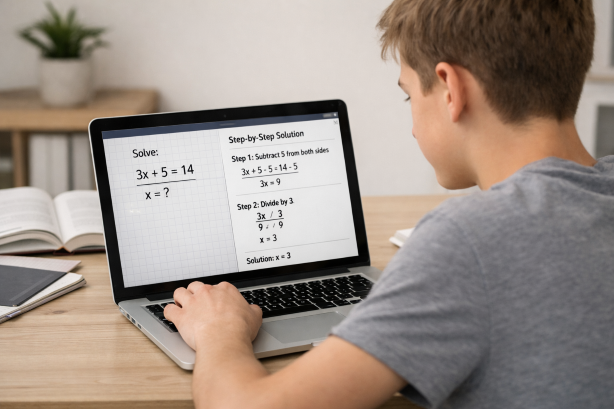
You’re staring at a problem set that looks like it was written in another language. The textbook explanation makes zero sense. You’ve scrolled through three YouTube videos and you’re more confused than when you started. Now imagine pulling out your laptop, taking a quick screenshot of that impossible question, and getting a clear, step-by-step explanation in seconds.
That’s exactly what picture homework help is — and it’s changing how students tackle difficult assignments in 2026. Instead of typing out complex equations, rewriting word problems, or trying to describe a diagram to a search engine, you simply capture an image of your homework and let AI do the heavy lifting. No more fumbling with special characters, no more lost-in-translation moments.
Scrny is a desktop and mobile application built around this exact concept. It turns any screenshot into an opportunity to learn, providing detailed solutions and guided explanations for math, science, coding, multiple choice, and virtually any academic subject. Whether you’re a high school freshman wrestling with algebra or a college junior navigating organic chemistry, picture homework help through Scrny puts expert-level tutoring right on your screen.
What Is Picture Homework Help?
Picture homework help refers to using image-based input — a screenshot, photo, or screen capture — to get assistance with academic questions. Rather than manually typing a problem into a search bar or homework forum, you simply capture the question as it appears on your worksheet, textbook, or screen, and an AI tool analyzes the image to deliver a solution.
This approach solves one of the biggest frustrations students face: accurately communicating the problem. Think about trying to type a calculus integral, a chemical equation, or a physics diagram into a text box. It’s tedious, error-prone, and sometimes flat-out impossible without specialized formatting tools. With picture-based homework help, what you see is what the AI sees — graphs, symbols, diagrams, and all.
Why Students Are Switching to Image-Based Homework Tools
The shift toward picture homework help isn’t just about convenience (though that’s a big part of it). Here’s why the approach has exploded in popularity:
- Accuracy of input: A screenshot captures the exact problem, reducing the risk of transcription errors that lead to wrong answers.
- Speed: Capturing a screen takes seconds, compared to minutes of typing complex notation.
- Versatility: Images can contain anything — handwritten notes, printed textbook pages, graphs, code snippets, diagrams, and multiple-choice options.
- Accessibility: Students who struggle with typing, formatting, or language barriers can still get help instantly.
In short, taking a picture of your homework and getting answers removes the friction between “I’m stuck” and “I understand.”
How Picture Homework Help Works with Scrny
Scrny is purpose-built for screenshot homework help. Here’s the step-by-step process:
- Encounter a tough question — whether it’s on a PDF, a web page, a digital textbook, or even a photo of a physical worksheet displayed on your screen.
- Take a screenshot using Scrny — the app runs on your desktop (Windows or macOS) and mobile, making it easy to capture any portion of your screen instantly.
- AI analyzes the image — Scrny’s AI engine reads the content of your screenshot, identifying the subject, problem type, and what’s being asked.
- Receive a detailed explanation — within seconds, you get a comprehensive breakdown of the solution, not just a final answer.
What sets Scrny apart from generic search tools is that it’s designed specifically for academic contexts. The AI doesn’t just attempt OCR (optical character recognition) and hope for the best — it understands mathematical notation, scientific formulas, programming syntax, and the structure of academic questions.
Answer Mode vs. Learn Mode
One of Scrny’s most powerful features is the choice between two distinct assistance modes:
Answer Mode delivers a direct, complete solution with full step-by-step working. This is ideal when you’re checking your work, running short on time, or need to see the complete solution path to understand where you went wrong.
Learn Mode takes a Socratic approach. Instead of handing you the answer, it asks guiding questions, provides hints, and walks you through the problem-solving process so you arrive at the answer yourself. This is the mode that transforms picture homework help from a shortcut into a genuine learning experience.
The ability to toggle between these modes means Scrny adapts to your needs in the moment. Reviewing for an exam and need to check fifty problems quickly? Answer Mode. Genuinely trying to master a new concept before tomorrow’s class? Learn Mode.
Subjects Where Picture Homework Help Shines
While you can screenshot virtually any academic question and get help, certain subjects benefit enormously from image-based input.
Math and Advanced Mathematics
Math is where picture homework help arguably makes the biggest difference. Consider the alternative: trying to type ∫₀^π sin²(x) dx into a search bar. With Scrny, you screenshot the integral exactly as it appears in your textbook or assignment, and the AI math homework helper returns a clean, step-by-step solution.
This applies across all levels:
- Algebra: Equations, inequalities, systems of equations
- Geometry: Diagrams, proofs, angle calculations
- Trigonometry: Identities, graphs, unit circle problems
- Calculus: Derivatives, integrals, limits, series
- Statistics: Probability distributions, hypothesis testing, data interpretation
- Linear Algebra: Matrix operations, eigenvalues, vector spaces
Science
Chemistry structures, physics diagrams, biology labeling exercises — science homework is inherently visual. A screenshot captures the diagram, the data table, or the reaction equation exactly as presented, allowing Scrny’s AI to interpret context that would be nearly impossible to communicate through text alone.
Coding and Computer Science
Stuck on a block of code that’s throwing an error? Screenshot it. Scrny can analyze code snippets, identify bugs, explain algorithms, and walk you through logic errors. This is far more efficient than copying and pasting code into a forum and waiting hours for a response.
Multiple Choice and General Subjects
Picture homework help isn’t limited to STEM. Screenshot a multiple-choice history question, a reading comprehension passage, an economics graph, or a foreign language exercise. Scrny’s AI identifies the question type and provides a relevant, well-reasoned explanation.
Why Picture Homework Help Beats Traditional Methods
Let’s be honest about the alternatives students have been using for years — and why they fall short.
Typing Into Search Engines
Google is great for general questions, but academic problems require precision. You can’t effectively search for the answer to a specific multi-step calculus problem or a nuanced multiple-choice question. You’ll get generic tutorials, not targeted solutions.
Homework Forums
Posting on forums like Reddit or Chegg’s Q&A boards means waiting — sometimes hours, sometimes days. And the answer you get may not match your specific problem, or the explanation might be written at a level that’s either too advanced or too basic.
YouTube Tutorials
Video tutorials are excellent for learning concepts but terrible for solving your specific problem. You might watch a 20-minute video on integration by parts when you only needed help with one tricky substitution step.
Traditional Tutoring
In-person or live online tutoring is effective but expensive and time-bound. You can’t summon a tutor at 11:47 PM when you’re finishing an assignment due at midnight.
Picture homework help with Scrny solves all of these problems simultaneously. It’s instant, specific to your exact question, available 24/7, and provides explanations at the right level of detail.
Why Choose Scrny for Picture Homework Help in 2026
The market for AI homework tools has grown significantly, but Scrny stands out for several key reasons:
- Desktop-native application: Unlike browser-based tools that can be clunky or limited, Scrny runs natively on Windows and macOS (as well as mobile), offering seamless screenshot integration with your actual workflow.
- Subject versatility: One tool covers math, science, coding, humanities, and more — you don’t need separate apps for different subjects.
- Dual learning modes: The combination of Answer Mode and Learn Mode means Scrny serves both your immediate needs and your long-term academic growth.
- Screenshot-first design: Every feature is built around image input, so the AI is optimized for interpreting visual academic content — not retrofitted as an afterthought.
- Privacy-conscious: Your screenshots and questions stay between you and the app. No public forums, no shared databases of your homework struggles.
Scrny isn’t just a picture homework solver — it’s a comprehensive AI homework helper that happens to use the most natural, efficient input method available.
Tips for Getting the Best Results from Picture Homework Help
To maximize the quality of explanations you receive, follow these best practices:
1. Capture the Complete Problem
Make sure your screenshot includes all relevant information — the full question, any given values, diagrams, and instructions. Cropping too tightly can remove context that the AI needs to provide an accurate solution.
2. Ensure Readability
If you’re photographing a physical worksheet, make sure the image is well-lit and in focus. For on-screen content, avoid capturing at extremely low resolution. Scrny’s AI is powerful, but clear input leads to better output.
3. One Problem at a Time
While it might be tempting to screenshot an entire page of problems at once, you’ll get more detailed and accurate explanations by focusing on one question per screenshot. This allows the AI to devote its full analysis to that specific problem.
4. Use Learn Mode for New Concepts
If you’re encountering a topic for the first time, resist the urge to jump straight to Answer Mode. Use Learn Mode to build genuine understanding. The guided questioning approach helps you internalize problem-solving strategies you can apply on exams — where you won’t have Scrny available.
5. Review the Steps, Don’t Just Copy
Even in Answer Mode, take the time to read through each step of the explanation. Identify where your own approach diverged. Understanding why each step works is what transforms homework help into lasting knowledge.
6. Use It as a Study Partner
Picture homework help isn’t just for assignments you’re submitting. Use Scrny to work through practice problems, review for exams, or explore topics you’re curious about. The more you engage with detailed explanations, the stronger your understanding becomes.
Frequently Asked Questions
How does picture homework help work with Scrny?
Scrny lets you take a screenshot of any homework question on your computer or phone screen. The AI analyzes the image — reading text, equations, diagrams, and code — and returns a detailed, step-by-step explanation. The entire process takes just seconds from screenshot to solution.
Can I take a picture of my homework and get answers for any subject?
Yes, Scrny supports a wide range of subjects including math (from basic arithmetic through advanced calculus), science (physics, chemistry, biology), computer science and coding, multiple-choice questions, and general academic subjects like history and economics. If it can be captured in a screenshot, Scrny can help.
Is using picture homework help considered cheating?
That depends entirely on how you use it. Scrny is designed as a learning tool, not a shortcut to bypass education. Using Learn Mode to understand concepts, checking your work after attempting problems yourself, and reviewing step-by-step explanations to identify mistakes are all legitimate study strategies. Always follow your school’s academic integrity policies and use Scrny as a supplement to your own effort.
Does Scrny work on both Windows and Mac?
Absolutely. Scrny is available as a native desktop application for both Windows and macOS, as well as on mobile devices. The screenshot functionality integrates smoothly with your operating system, making it easy to capture any homework question regardless of what platform you’re working on.
How accurate is the picture homework help from Scrny?
Scrny’s AI delivers highly accurate solutions across a wide range of subjects and difficulty levels. However, like any AI tool, it’s best used as a study aid rather than an infallible oracle. For complex or ambiguous problems, reviewing the AI’s reasoning and cross-referencing with your course materials is always a smart practice.
Homework doesn’t have to be a nightly battle against confusion and frustration. With picture homework help, the gap between “I’m stuck” and “I get it” shrinks to the time it takes to capture a screenshot. Scrny brings together the simplicity of image-based input with the depth of AI-powered explanations, giving you a tool that’s as useful for last-minute assignment checks as it is for deep, concept-building study sessions.
If you’re ready to transform how you approach homework in 2026, Scrny is built for exactly this moment. Screenshot the problem. Understand the solution. Move forward with confidence.
Turn a Screenshot Into an AI Answer in 3 Seconds.
Snip an image and let our AI answer generator do the rest.
Save time: no copy-pasting questions.
Stay accurate: 99 % accuracy using the latest AI answer generator technology
Monthly Subscription. Cancel anytime.
Recommended Articles

[
AI Homework Helper: Screenshot Any Question, Get Instant Answers
](https://scrny.ai/)
By Scrny.ai
[
How to Use Screenshot Homework Help: Snap a Photo, Get Step-by-Step Solutions
](https://scrny.ai/blog/screenshot-homework-help)
By Scrny.ai

[
Best AI Homework Helper 2026: Top Tools Compared
](https://scrny.ai/blog/best-ai-homework-helper)
By Scrny.ai