

Search engines find pages that already exist. An AI question answer generator does something different: it reads your question — with your numbers, your diagram, your professor's weird notation — and produces an answer that has never existed anywhere, because nobody has ever asked exactly that.
That distinction sounds small. It's the whole product. Your homework problem, with its particular values and conditions, isn't on page one of Google. It isn't in a solutions database. It has to be generated, and how well a tool does that comes down to the pipeline under the hood.
We build one of these tools, so this post explains the machinery honestly: what happens between "screenshot" and "answer," where each stage can fail, and what a good implementation does about it.
The pipeline: what happens inside the 2.4 seconds
When you capture a question in Scrny, the answer that comes back 2.4 seconds later (that's our measured average) has been through five distinct stages.
1. Vision parsing
The screenshot goes to a vision model that reads everything in the frame: printed text, handwriting, mathematical notation, code, table structure, and diagrams. This is more than OCR. Classic OCR gives you a string of characters; vision parsing reconstructs structure — this expression is a numerator, that superscript is an exponent and not a footnote, the arrow in the diagram points from the battery to the resistor.
This stage is why screenshot input beats typing for anything with notation. You cannot comfortably type a definite integral, a matrix, or a Punnett square — and every transcription is a chance to introduce the error you'll then blame on the AI.
2. Question classification
Next the system works out what kind of ask this is, because the right behavior differs radically. "Solve for x" needs a worked derivation. "Which of the following…" needs option-by-option analysis. A stack trace needs a diagnosis, not a solution set. Classification decides which reasoning strategy runs — it's the same decision you make instinctively when you read a question, made explicit.
3. Reasoning
The model works the problem the way you'd want to see it worked: sequentially, with each move justified. For a math problem that means named rules at each step (chain rule, integration by parts); for multiple choice it means a case for the right option and a case against each distractor.
4. Verification
Generation without checking is how AI tools embarrass themselves. Where the problem type allows it, the answer is verified before you see it — for math, both symbolically and numerically: does the derived expression simplify to the same form, and does substituting values back in actually balance? Verification is the difference between "the model is confident" and "the answer checks out."
5. Formatting
Finally the answer is laid out for reading: steps in order, the rule named beside each one, the final result stated plainly. Formatting sounds cosmetic; it's what makes the answer checkable by a human, which is the point.
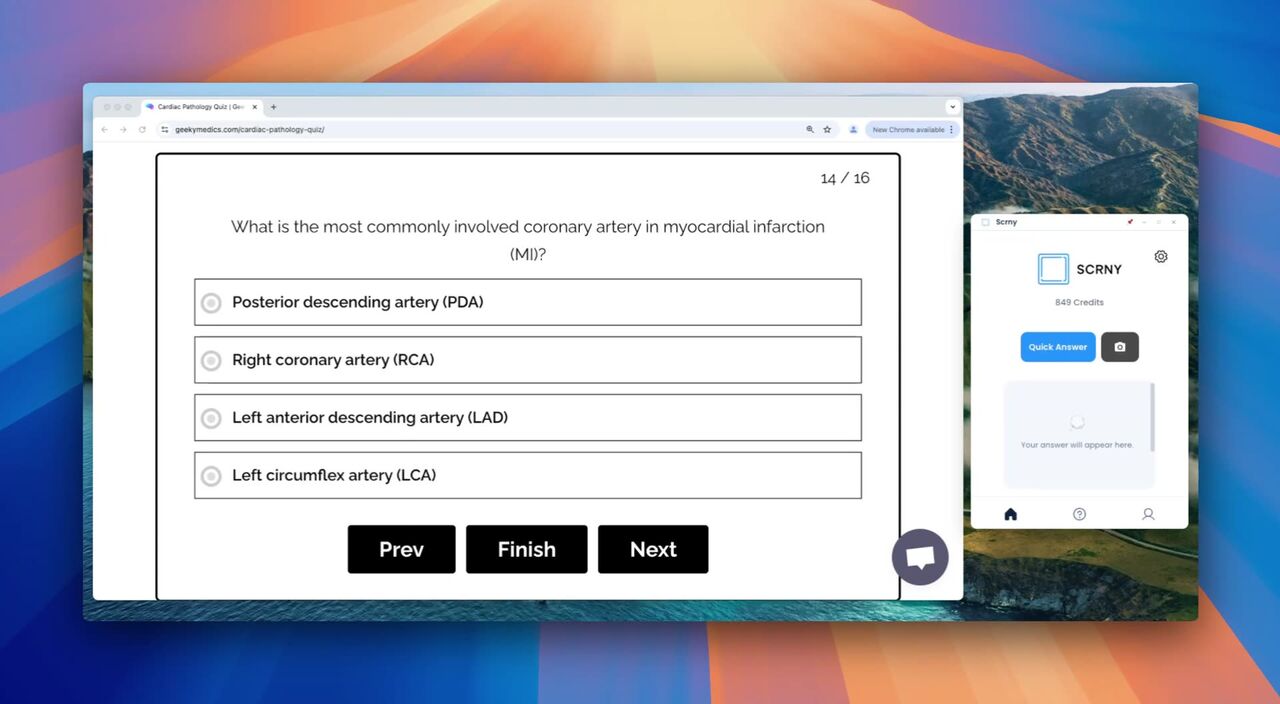
The same pipeline, four different jobs
Scrny runs this machinery in four modes, and seeing one concrete example per mode shows how differently the reasoning stage behaves.
Multiple Choice. Input: a screenshot of an AWS practice question — "Which service provides serverless compute?" with four options. Output: the correct option, a one-line reason it's right, and a one-line reason each distractor is wrong ("EC2 is compute but provisioned, not serverless…"). On standard practice-exam banks — AZ-900, AWS Cloud Practitioner, CompTIA A+/Network+/Security+, CCNA — this mode measures 99% accuracy.
Math Solver. Input: a photographed handwritten problem, "∫ x·eˣ dx". Output: integration by parts named as the strategy, u and dv chosen and shown, the derivation line by line, and the result x·eˣ − eˣ + C — verified by differentiating it back to the integrand. Coverage runs from algebra through multivariable calculus, linear algebra, statistics, and ordinary differential equations.
Learn Mode. Same integral, opposite behavior: instead of the worked answer you get the first Socratic nudge — "This is a product of two functions. What technique handles integrals of products?" — and the conversation guides you until you produce the answer. Same parsing and classification stages; the reasoning stage deliberately withholds.
Tech Support. Input: a screenshot of a Java stack trace. Output: plain-English diagnosis — what the exception means, which line of your visible code triggered it, and what to change. No math, no options; the classification stage routed to a completely different reasoning strategy.
One pipeline, four behaviors. That's what "generator" buys you over a lookup service.
A worked example, end to end
To make the stages concrete, here's one small algebra question through the whole pipeline. You screenshot 2(x + 3) = 5x − 9 from a homework PDF.
- Parsing reconstructs the equation, including the parenthesised group — no chance to fat-finger a bracket the way you might typing it.
- Classification tags it: single linear equation, solve for x, worked steps expected.
- Reasoning produces the derivation: distribute the 2 (→
2x + 6 = 5x − 9), collect x-terms (→15 = 3x), divide (→x = 5), each move labeled with the operation performed. - Verification substitutes back: left side
2(5+3) = 16, right side5(5) − 9 = 16. Balanced — the answer ships. - Formatting lays those steps out in order, so if your own attempt got
x = 3, you can find the exact line where you diverged.
Trivial problem, but every stage earns its keep at exactly the moments problems stop being trivial.
Where this approach genuinely wins — and where it doesn't
Generated answers are strongest on questions that are structured and verifiable: math at any level, multiple choice, science calculation, code. The verification stage has something to grab onto, so errors get caught mechanically.
They're weakest where verification has nothing to grab: essay prompts, opinion questions, very novel proof-based work. A generator will produce fluent output for these, but fluency isn't correctness, and you should treat those answers as a starting point, not a result. We'd also point serious K-12 photo-math users at Photomath without embarrassment — it's excellent in that range; Scrny's case is the step attribution, verification, and the coverage above it (the full comparison is honest about this).
And a generator is a study tool, not a substitute for studying. If you find yourself pasting answers without reading the steps, switch to Learn Mode — the reasoning is the product; the final line is just where it stops.
Choosing between the tools in this category
The practical differences to check before you pick anything (us included):
| What to check | Why it matters |
|---|---|
| Input format | Typing equations into a chat box is slow and error-prone; screenshot input preserves notation and diagrams exactly |
| Shown work | An answer without steps can't be checked, learned from, or graded |
| Verification | Does anything confirm the answer, or is it one unchecked generation? |
| Coverage ceiling | Many tools stop at K-12 math; check against your actual coursework |
| Honest pricing | "Free" tools pay for themselves somehow — ads, caps, watermarks, or your data |
We've written up direct comparisons against ChatGPT and AnswersAI if you're deciding between specific tools, and our guide to the best AI homework helpers covers the wider field.
Trying it
Scrny runs as a desktop app: capture the question region, pick a mode, read the worked answer. Plans are $1.99/month for 15 answers (Starter), $5.99 for 200 (Study), or $7.99 for 500 (Finals) — cancel anytime. There's no free tier, deliberately: every answer is a real vision-model call, and the $1.99 entry keeps the cost honest instead of hiding it behind ads.
If your questions come off paper worksheets rather than screens, the homework scanner workflow covers that end to end.