
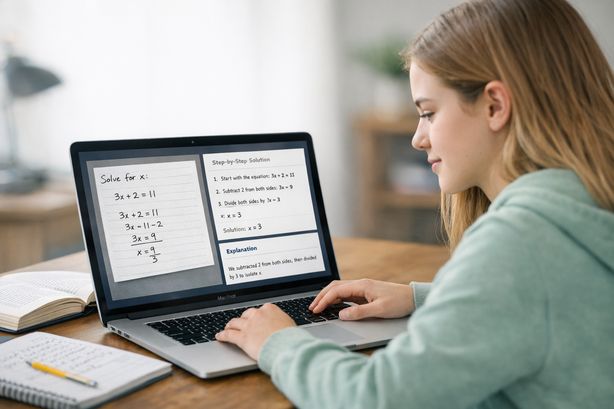
You’re staring at a problem set that might as well be written in ancient Greek. The textbook explanation made sense in class — sort of — but now, sitting alone at your desk at 10 PM, you can’t figure out where to even start. You snap a photo with your phone or take a screenshot on your laptop, hoping the internet has answers. Sound familiar?
This is the exact moment where an AI homework helper picture tool changes everything. Instead of scrolling endlessly through forums, watching 45-minute YouTube videos to find the one relevant minute, or typing out a complex equation character by character, you simply capture your homework question as an image. The AI reads it, understands it, and walks you through the solution — step by step.
Tools like Scrny have been built from the ground up around this idea: that the fastest path from confusion to understanding starts with a screenshot. Whether it’s a calculus integral, a chemistry diagram, a multiple-choice history question, or a block of buggy code, Scrny’s desktop app lets you screenshot the problem and get an intelligent, detailed explanation in seconds. No copy-pasting. No reformatting. Just point, capture, and learn.
What Is an AI Homework Helper That Works From Pictures?
An AI homework helper picture tool is software that uses artificial intelligence — specifically computer vision and large language models — to analyze an image of a homework question and generate a meaningful response. Rather than requiring you to manually type a problem into a search bar or chat interface, these tools accept visual input: screenshots, photos of textbook pages, handwritten notes, or even projected slides.
The technology behind this process involves several layers:
- Optical Character Recognition (OCR): The AI identifies and extracts text, numbers, symbols, and formatting from the image.
- Visual Understanding: For diagrams, graphs, geometric shapes, or code blocks, the AI interprets spatial and structural relationships within the picture.
- Contextual Reasoning: Once the content is extracted, a language model processes the question, identifies the subject area and difficulty level, and generates an appropriate response.
The result is a tool that feels almost magical — you show it a picture, and it understands what you’re looking at. But it’s not magic; it’s a carefully engineered pipeline designed to handle the messy, varied reality of how homework actually looks in the real world.
Why Pictures Are Better Than Typing
If you’ve ever tried to type a complex math equation into a search engine, you already know the problem. Fractions, exponents, integrals, Greek letters, chemical formulas, circuit diagrams — these don’t translate easily into plain text. You spend more time fighting with formatting than actually solving the problem.
A picture-based approach eliminates that friction entirely. Your homework question already exists in visual form — on a worksheet, in a textbook, on a screen. Taking a screenshot or snapping a photo preserves all the formatting, symbols, and context exactly as they appear. The AI does the hard work of interpretation, so you can focus on what matters: understanding the material.
How Scrny Works as a Screenshot Homework Helper
Scrny is a desktop application available for both Windows and macOS that was designed specifically around the screenshot-to-solution workflow. Here’s how the process works in practice:
Step 1: Capture the Question
Using Scrny’s built-in screenshot tool or a simple keyboard shortcut, you select any area of your screen. This could be:
- A math problem from an online textbook or PDF
- A multiple-choice question from a learning management system
- A diagram or graph from a science assignment
- A code snippet that’s throwing errors
- A handwritten problem you’ve photographed and opened on your computer
The screenshot captures exactly what you see — no retyping, no reformatting, no losing information in translation.
Step 2: AI Analysis
Once the image is captured, Scrny’s AI engine goes to work. It identifies the subject area, extracts the relevant information from the image, and begins processing a response. The AI is trained to handle a wide range of academic subjects and question formats, including:
- Mathematics: Algebra, geometry, trigonometry, calculus, statistics, and more
- Science: Physics problems, chemistry equations, biology concepts, and lab-related questions
- Coding: Debugging, syntax analysis, algorithm explanation, and code generation
- Multiple Choice: Analyzing all options, explaining why the correct answer is right and why distractors are wrong
- General Subjects: History, literature, economics, and other text-based disciplines
Step 3: Choose Your Learning Style
This is where Scrny distinguishes itself from basic photo-answer tools. When you receive your result, you have two distinct modes to choose from:
- Answer Mode: Provides a direct, complete solution with step-by-step work shown. Ideal when you need to check your work, understand the final methodology, or confirm you’re on the right track.
- Learn Mode: Uses a Socratic approach, guiding you through the problem with questions and hints rather than handing you the answer outright. This mode is designed to build genuine understanding and develop your problem-solving skills over time.
This dual-mode system acknowledges a simple truth: sometimes you need to see the answer to understand the process, and sometimes you need to struggle productively with guidance. Both are valid learning strategies, and Scrny gives you the choice.
Real-World Scenarios: When a Picture-Based Homework Helper Saves the Day
Let’s look at specific situations where using an AI homework solver from a picture makes a measurable difference.
The Late-Night Calculus Crisis
It’s 11 PM, and you’re working through a set of integration-by-parts problems. Problem 7 has a nested function that doesn’t fit any of the patterns from your notes. You screenshot the problem in Scrny, and within seconds, you see not just the answer but every substitution step, clearly labeled. You realize you were choosing the wrong component for “u” in the integration formula. Now you go back and solve problems 8 through 12 on your own — correctly.
The Confusing Chemistry Diagram
Your organic chemistry assignment includes a reaction mechanism with arrows, molecular structures, and reagent conditions. Typing this into any text-based tool would be nearly impossible. But a screenshot captures the entire diagram perfectly. Scrny identifies the reaction type, explains the electron flow indicated by the arrows, and describes why specific products form.
The Debugging Nightmare
You’re learning Python, and your function is returning the wrong output. You’ve been staring at the code for an hour. You screenshot the code and the error message together, send it to Scrny, and get a clear explanation: you have an off-by-one error in your loop index, and the AI shows you exactly which line to fix and why the original logic was flawed.
The Multiple-Choice Mind Game
A practice AP exam question gives you five answer choices, and you’ve narrowed it down to two but can’t decide. You screenshot the question, and Scrny not only identifies the correct answer but explains the reasoning behind eliminating each wrong option — giving you a framework for approaching similar questions on the actual exam.
Why Choose Scrny as Your AI Homework Helper Picture Tool
There are several AI tools on the market in 2026 that accept image input, so why does Scrny stand out? Here are the key differentiators:
- Desktop-Native Performance: Scrny runs as a native desktop app on Windows and macOS, not a slow browser tab. Screenshot capture is instant and integrated directly into your workflow. There’s no uploading, no waiting for page loads, and no browser extensions to manage.
- Intelligent Subject Detection: You don’t need to tell Scrny what subject your question is about. The AI automatically identifies whether it’s looking at a math problem, a science diagram, a block of code, or a text-based question and adjusts its analysis accordingly.
- Dual Learning Modes: The combination of Answer Mode and Learn Mode means Scrny adapts to your needs in the moment. Cramming before an exam? Use Answer Mode to review solutions quickly. Building foundational understanding? Switch to Learn Mode for guided discovery.
- Comprehensive Explanations: Scrny doesn’t just give you a letter or number — it shows its reasoning. For math, you get every step. For multiple choice, you get analysis of every option. For code, you get line-by-line commentary. The goal is always understanding, not just completion.
- Privacy and Focus: As a desktop application, Scrny keeps your workflow contained and distraction-free. You’re not bouncing between browser tabs or getting pulled into social media feeds. You screenshot, you learn, you move on.
Tips for Getting the Most Out of a Picture-Based AI Homework Helper
To maximize the value you get from tools like Scrny, keep these best practices in mind:
- Capture the Full Context: Make sure your screenshot includes the complete question, all answer choices (for multiple choice), any relevant diagrams, and instructions. The more context the AI has, the better its response will be.
- Screenshot One Problem at a Time: While it might be tempting to capture an entire page, you’ll get more focused and detailed explanations by isolating individual questions.
- Use Learn Mode First: Before jumping to Answer Mode, challenge yourself with Learn Mode. The Socratic method builds deeper retention, and you might surprise yourself with how much you already know when given the right nudge.
- Compare with Your Own Work: Use the AI’s solution as a reference point, not a replacement for your own effort. Try solving the problem first, then screenshot it to check your approach. This “attempt, then verify” cycle is one of the most effective study strategies.
- Pay Attention to the Explanation, Not Just the Answer: The step-by-step reasoning is where the real learning happens. If the AI uses a method you haven’t seen before, take note — it might be a more efficient approach to similar problems.
- Use It for Review, Not Just New Problems: Screenshot problems from past exams or quizzes that you got wrong. Understanding your mistakes is one of the fastest ways to improve your performance.
- Keep Your Screenshots Clear: If you’re photographing handwritten work, make sure it’s legible. Good lighting and neat handwriting make a significant difference in how accurately the AI can read your picture-based homework submissions.
Frequently Asked Questions
How does an AI homework helper picture tool actually read my screenshot?
The AI uses a combination of optical character recognition (OCR) and visual understanding models to extract text, symbols, diagrams, and formatting from your image. It then processes this information through a language model that interprets the question and generates a detailed response. Scrny’s engine is optimized to handle academic content across multiple subjects, including handwritten text and complex mathematical notation.
Can I use a picture-based homework helper for subjects other than math?
Absolutely. While math is one of the most popular use cases because of how difficult equations are to type, tools like Scrny handle science, coding, multiple choice, and general humanities questions with equal depth. Any question that can be captured in a screenshot can be analyzed — from physics diagrams to literary analysis prompts.
Is using an AI homework helper from a picture considered cheating?
That depends entirely on how you use it. Using Scrny to understand concepts, check your work, and learn problem-solving methods is a legitimate study strategy — no different from working with a tutor. Features like Learn Mode are specifically designed to guide your thinking rather than hand you answers. The key is using the tool to build understanding, not to bypass the learning process entirely. Always follow your school’s academic integrity policies.
Does Scrny work with handwritten homework problems?
Yes. If you photograph your handwritten work and have the image on your computer screen, you can screenshot it within Scrny. The AI is capable of reading handwritten text and equations, though clear handwriting and good image quality will improve accuracy. For best results, make sure there’s strong contrast between your writing and the background.
The gap between staring at a confusing problem and actually understanding it shouldn’t require hours of frustration, outdated forum threads, or expensive tutoring sessions. An AI homework helper picture tool like Scrny bridges that gap in seconds — you screenshot the question, and the AI delivers a clear, detailed explanation tailored to the exact problem in front of you.
Whether you’re tackling advanced calculus at midnight, decoding a chemistry mechanism before a quiz, or debugging code for a computer science project, Scrny gives you a dedicated learning partner that’s always ready when you are. With both Answer Mode for quick verification and Learn Mode for deeper understanding, it adapts to how you learn best.
Stop struggling in silence. Visit Scrny.ai to see how a simple screenshot can transform the way you study — one problem at a time.
Turn a Screenshot Into an AI Answer in 3 Seconds.
Snip an image and let our AI answer generator do the rest.
Save time: no copy-pasting questions.
Stay accurate: 99 % accuracy using the latest AI answer generator technology
Monthly Subscription. Cancel anytime.
Recommended Articles

[
AI Homework Helper: Screenshot Any Question, Get Instant Answers
](https://scrny.ai/)
By Scrny.ai
[
How to Use Screenshot Homework Help: Snap a Photo, Get Step-by-Step Solutions
](https://scrny.ai/blog/screenshot-homework-help)
By Scrny.ai

[
Best AI Homework Helper 2026: Top Tools Compared
](https://scrny.ai/blog/best-ai-homework-helper)
By Scrny.ai